


One-Pager 101: The Ultimate Guide
This is the seventh post in One-Pager 101: The Ultimate Guide, a step-by-step series on how to create a compelling one-pager for any initiative—whether you’re running a business, leading a nonprofit, or planning an event. At The Riparian, we keep it high-yield and low-fluff because your time is better spent doing the work, not reading about it. Browse the full series here →
The Right Few Words
Usually, I start these posts with a little vignette from my life that ties into the week’s theme. This time, as I sat down to write about the how important a solid edit is for a one-pager, I kept thinking about the political moment we’re in (and don’t worry, this isn’t a soapbox).
When we think about condensed messaging, we often jump to taglines and jingles. You probably know exactly who said, “Just do it” or “Taste the rainbow.” Even a local ad from my childhood still lives rent-free in my head: “If you have a water damage, call Alpine.”
But it’s not just marketers who understand the power of a few good words. Movements, ideologies, and even old proverbs have been using them for centuries– not to sell you a product, but to deliver a deeper belief, truth, opinion, or story. Think about phrases like:
- Actions speak louder than words
- Love is Love
- Don’t tread on me
- It takes a village
- Me Too
- Make America Great Again
- Black Lives Matter
- You reap what you sow
- Make love, not war
And one from this past weekend: No Kings
Regardless of political affiliation, these phrases hit. In just a few words you’re nodding, fuming, cheering, or rolling your eyes. They’re powerful because they’re distilling a much larger story into something short and sticky. They inspire. They provoke. They mobilize. Sometimes, they even radicalize.
There is power in words.
There is a huge power in the right words.
There is immense power in the right few words.
Today, we’re going to explore how to find those few right words for your one-pager by editing the banging story you wrote in the last step.
So, without further ado, here are some of my go-to strategies for a first pass at condensing my story but keeping its heart.
Table of Contents
Twelve Ways to Cut Your Word Count Without Losing Your Message

1. Trim redundancy
Only repeat yourself if it’s really, really important. (See what I did there?) Check to see if you’ve already expressed an idea elsewhere or if there’s a way to combine two sentences into one with a small tweak.
Ask yourself:
- Have I said this already?
- Can I combine or tighten these ideas without losing meaning?
Tree Frog Solutions One-Pager Example
I did the mosaic storytelling step right along with you utilizing TFS as an example. The examples in this post are actual edits to the text I included there!
Before
Tree Frog Solutions offers expert partnership for leaders and teams doing meaningful work with limited time, resources, or support. We help untangle the things they don’t have capacity to solve alone—without the fluff, the jargon, or the budget-breaking rates. We combine strategic insight, operational know-how, creative copywriting, and event expertise to help organizations stop spinning their wheels and start moving forward—effectively and sustainably.
After
Tree Frog Solutions offers expert partnership for leaders and teams doing meaningful work with limited time, resources, or support. We help untangle the things they don’t have capacity to solve alone—without breaking the bank.
2. Remove filler words and qualifiers
Words like “really,” “incredible,” “actually” are like the “ums” and “likes” of verbal speech. They can, at best, fill up your one-pager with useless jabber, and, at worst, hurt your credibility. Don’t be afraid to let the data, quotes, or results speak for themselves.
Ask yourself:
- Would this sentence be stronger without this word?
- Am I using this word to sound impressive—or be clear?
Before
We tackle the root causes of heavy burnout, incredible anxiety, chronic overwhelm, and stalled progress by addressing the huge challenges that cause them.
After
We tackle the root causes of burnout, anxiety, overwhelm, and stalled progress by addressing the challenges that cause them
3. Make sure your content is relevant
Every element should support your core story. A great stat about international site traffic might look flashy, but it won’t help if your goal is to fund a local vehicle. Good content isn’t always relevant content. Edit accordingly.
Ask yourself:
- Will this matter to my audience—or just to me?
- Does this support the message or CTA?
4. Shorten quotes
Don’t be afraid to use the magical ellipses to bring down the word count of your quotes. See if you can pinpoint the most powerful part(s) of the quote and edit around that.
Ask yourself:
- What’s the emotional core of this quote?
- Can I shorten it without losing meaning?
Before
“Our organization worked with Anna Beth on a web project that was long overdue, but we didn’t have the capacity to tackle it on our own. Her support was invaluable. She was thorough, thoughtful, and helped us create a project plan that made sense for our organization’s needs, outlined clear project steps and goals, and ensured all bases were covered. And the results were better than we could have hoped for. Working with her was the best decision!” —Anna Masi, Communications Director, DC Greens (Washington, D.C.)
After
“[We] worked with Anna Beth on a web project that was long overdue, but we didn’t have the capacity to tackle… Her support was invaluable. She was thorough, thoughtful, and helped us create a project plan that made sense for our organization’s needs… And the results were better than we could have hoped for.” — Anna Masi, Communications Director, DC Greens (Washington, D.C.)
5. Use formatting to improve clarity
Text formatting like bullet points, italics, and bold can make it a lot easier for your reader to keep up with your story without you having to rewrite anything at all. You may find that if you format a section, you can edit out a few words along the way too.
Ask yourself:
- Am I visually guiding my reader or making them work?
- Would this be clearer in bullets or headings?
Before
The Challenges We Address
We tackle the root causes of burnout, anxiety, overwhelm, and stalled progress by addressing the challenges that cause them. That often means addressing three core challenges: Time (think endless to-do lists, decision fatigue, and not enough space to try new ideas); Capacity (tight budgets, limited know-how, and too few hands to move the vision forward); and Clarity (no roadmap, unclear performance, and hidden leaks in time, money, or momentum).
After
The Challenges We Address
Time
- Endless to-do lists and constant decision fatigue
- Energy-draining systems, marketing, or events
- Too little time or resources to implement creative solutions
Capacity
- Tight budgets and little room for trial-and-error fixes
- Limited technical, strategic, or operational know-how
- Not enough team capacity to carry out the vision
Clarity
- No clear roadmap to reach growth goals
- Uncertainty about what’s working—and what’s not
- Hidden losses of time and money
6. Order and format your bullet points
Strategic ordering makes your point clearer and more persuasive, and might show you things to cut. Bonus Tip: Make sure to edit your bullet points so they’re all in the same format.
Ask yourself:
- What’s my strongest point—and does it come first?
- Are all my bullets following the same structure?
Before
What Changes When You Partner with TFS
- Finally knowing what’s broken, what’s fine, and what can wait
- Smoother systems and stronger workflows
- Less wasted time and money—and more of both
- Clearer direction and confident decision-making
- Events that succeed without stress
- Greater momentum, visibility, and capacity to do the work that matters
After
What Changes When You Partner with TFS
- You stop wasting time, money, and energy on the wrong things
- You generate more revenue—with less stress
- You make confident, well-informed decisions backed by strategy
- Your systems run smoother—and your people do, too
- Your events, messaging, and infrastructure finally support your mission
- You gain a trusted partner who’s invested in your mission
7. Do a second-round cut in visual form
Once you move your content into a layout (even a rough Canva mockup), you’ll often find more to cut. You’ll see where the eye naturally lands—and what’s getting skimmed. For me, transitioning to the graphic creation is a big part of the cutting process (you’ll see it on clear display in our final step: Create). Even if you’re handing off your copy to another team member for the final graphic, it’s worthwhile to mock something up for editing purposes.
Ask yourself:
- Could I say this more simply now that I see how it looks?
- Does the layout feel dense or overwhelming?
Too many words, not enough punch? I can help. If trimming your story feels overwhelming—or if you’re too close to it to see what’s essential—I’m just a message away. Whether you need a fast editing eye or a full one-pager that’s clear, compelling, and clean, I’ve got your back. Work with me →
8-12. Last Pass Magic
To round things out, here are a few more editing strategies that don’t need much exposition (but are still highly effective).
- Read it out loud. If it sounds too long, it probably is.
- See if you can take it “too far.” Keep a reference draft, of course. But, you might just find that you don’t need half your words after all.
- Take a break. No, seriously! I often take a full 24 hours between drafts. It’s amazing what fresh eyes can see.
- Ask ChatGPT. While it’s known for unnecessarily wordy drafts, ChatGPT can help make things shorter too, especially when it comes to identifying redundancies.
Editing in Action
Here’s a short example of how I think about a first pass of edits. I’m using part of the text from my Tree Frog Solutions story example in the last post.
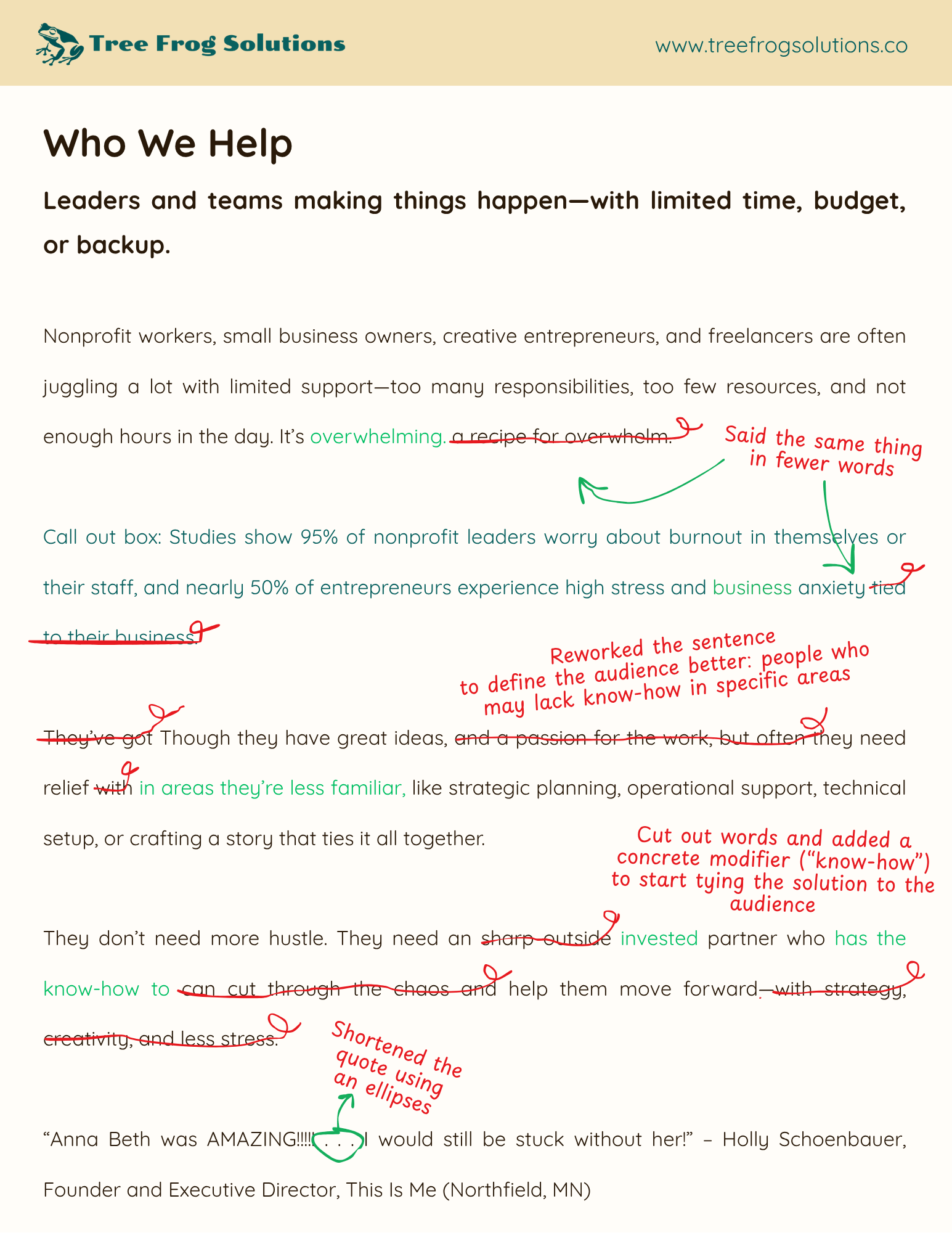
Not only do these edits cut down on the word count, they also tighten the message and make the story more compelling. Win-win!
What’s Next

With the condensing step complete, you’re pretty darn close to a finished one-pager. Only two steps to go!
Next up: a deceptively simple one—making sure your message is clear to the people it needs to reach, not just to you.
It might sound redundant, but trust me: this step is super important. It makes sure all this hard work lands for the right people.
See you soon for Step 6: Clarify!
Don’t want to miss the next installment?
Be sure to subscribe to the newsletter to get blog updates and free resources. No spam, ever.
Read the full series: One-Pager 101: The Ultimate How-To Guide (for Real Results)
- What Is a One-Pager? Six Powerful Results for Every Initiative (One-Pager 101)
- How to Gather Key Info Before You Start (One-Pager 101, Step 1: Compile)
- How to Identify Your Target Audience (One-Pager 101, Step 2: Crowd)
- How to Craft a Strong Call to Action, Part One (One-Pager 101, Step 3: Call)
- How to Craft a Strong Call to Action, Part Two (One-Pager 101, Step 3: Call)
- How to Use the Mosaic Model for Brand Storytelling (One-Pager 101, Step 4: Compose)
- How to Make Edits That Say More with Fewer Words (One-Pager 101, Step 5: Condense)
- How to Make Your Message Clear to Others (One-Pager 101, Step 6: Clarify)
- How to Visually Design for Impact (One-Pager 101, Step 7: Create)


One response to “How to Make Edits That Say More with Fewer Words (One-Pager 101, Step 5: Condense)”
[…] How to Make Edits That Say More with Fewer Words […]